0 Comments

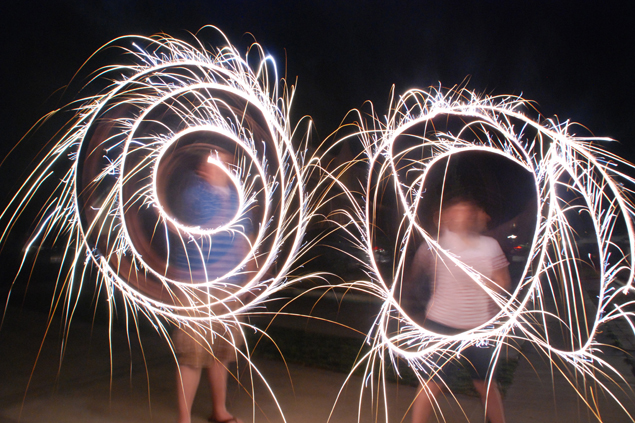
I hope you all have some fun and safe activities planned for the Fourth of July this year! One of the fun things we did last year was take some pictures using sparklers! Well, I didn’t take them — my daughter-in-law Kaitlyn took them, but I was so impressed when I saw them. I had no idea that you could capture such amazing images using just a regular camera.
And as it turns out, you can get sparkler photos like this with your phone, too! Since I’m pretty sure most of us will be either watching or participating in some fireworks activity for Independence Day, I asked Kaitlyn to share with us how she accomplished this “photo magic.”
Take it away Kaitlyn!
Jill asked me to share some tips on taking fun photos with your holiday sparklers. Maybe some of you have seen photos like the one above floating around Facebook and Instagram.
Since I grew up in Southern California where fireworks are illegal because of the fire danger, I had never been able to use sparklers. So last year when I got to use sparklers for the first time I just had to try taking some of these cool photos.
You’ll need:
- Sparklers & lighter or matches
- DSLR camera or point-and-shoot camera or your phone
- Tripod or a flat, sturdy surface
- Friends (1 or more)
How to Shoot Sparkler Art with Phone or Camera
If you are using a point-and-shoot, set your camera to “night-scene.” While on night-scene, you won’t have to make any f-stop or shutter adjustments. The same goes for phones – put the phone’s camera on night mode. Some point and shoot cameras have fireworks settings, so try both ways. Experimentation is the key to getting great photos.

For DSLRs, set the camera to “manual.” Adjust your aperture to 16 and your ISO to 1000. Your shutter speed, for a non-flash photo, should be about 3 seconds to capture the sparkler’s light, as well as illuminate your friends a little bit.

(I like to put my camera on the “Shutter Preferred” mode – on my Nikon it’s the “S” mode. Using the S setting on the camera allows you to tell the camera to set everything else except the shutter speed.)

Once you get your settings down, put your camera or phone on a tripod or a flat, sturdy surface to insure that it stays totally still. Since your shutter will stay open for so long, any movement of the camera will affect the outcome of your picture.
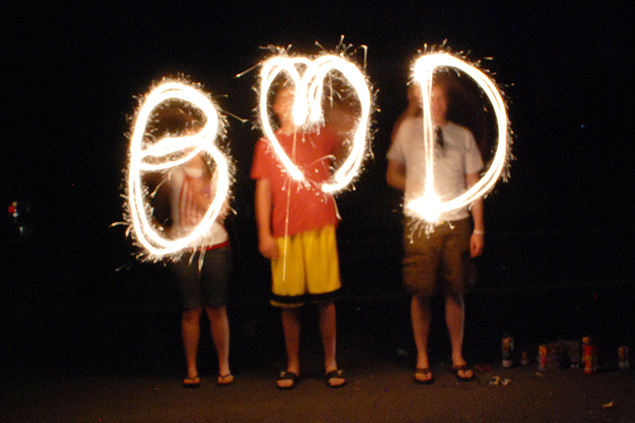
Now you’re ready for sparklers! Decide if you want to spell something out or just make a fun design. Once the photographer pushes down the shutter release (the button you press to take the picture) start drawing your desired design in the air with your sparkler. Draw it as many times as you can while the shutter stays open. Drawing slowly creates a thicker sparkler line, while quicker drawing creates a thinner one.

If you are spelling something out, you’ll have to spell it backwards for it to turn out right in the photo (or you can flip it horizontally in your image editing program.)
Try out a few pictures and adjust the shutter speed up (or faster) if the pictures are too bright, and down (slower) if the pictures are too dark. Once you get the exposure set you can go crazy with sparklers!
BONUS TIP: If your area has a fireworks ban because of fire dangers, don’t despair — you can get the same kinds of photos using Glow Sticks!
Have you tried taking sparkler photos or fireworks photos?